
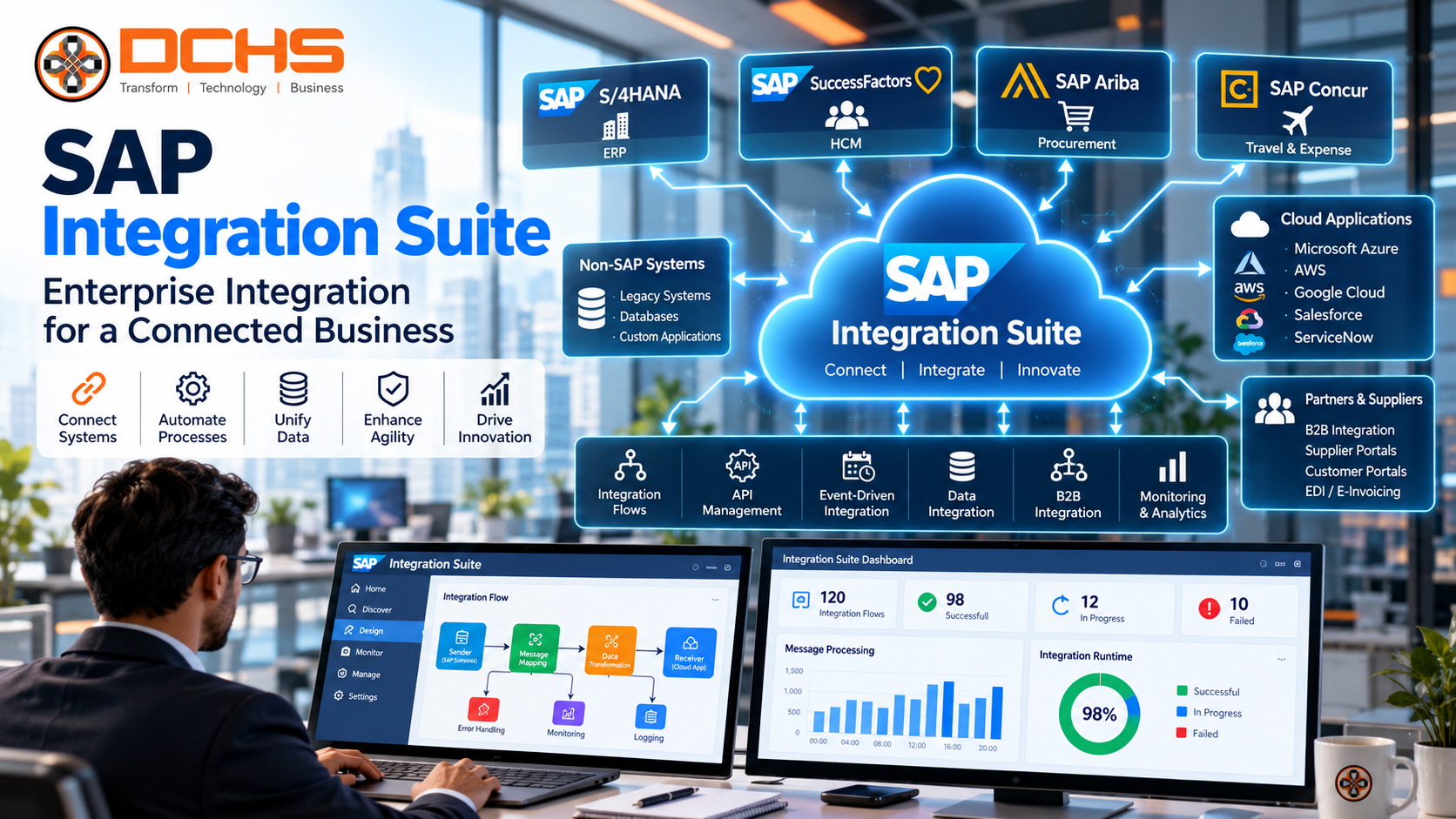
SAP Integration Suite: Complete Guide for Businesses
Modern businesses rely on multiple applications to manage finance, procurement, sales, manufacturing, customer relationships, human resources and supply chain operations. Although each application serves a specific purpose, disconnected systems can create data silos, manual work, reporting delays and operational inefficiencies.
For organizations using SAP alongside other enterprise applications, connecting these systems is essential for achieving a more integrated digital environment.
SAP Integration Suite helps businesses connect applications, data, APIs and business processes across SAP and non-SAP systems. As part of SAP Business Technology Platform (SAP BTP), it provides integration capabilities for cloud, on-premises and hybrid environments.
Organizations can use SAP Integration Suite to connect SAP S/4HANA with third-party applications, manage APIs, exchange business events, support business-to-business (B2B) transactions and modernize integration architectures.
However, successful enterprise integration involves more than connecting two applications. Businesses need a clear integration strategy, secure data exchange, reliable monitoring, appropriate governance and a scalable architecture.
This guide explains what SAP Integration Suite is, how it works, its key capabilities, business benefits, industry applications, implementation process, common challenges and best practices.
What Is SAP Integration Suite?
SAP Integration Suite is an enterprise integration platform as a service (iPaaS) that enables organizations to connect applications, data and business processes across different technology environments.
It helps businesses establish communication between SAP applications, third-party software, cloud services and on-premises systems.
For example, a company may use SAP S/4HANA for enterprise resource planning, Salesforce for customer relationship management, a separate warehouse management system and an external e-commerce platform. SAP Integration Suite can help connect these applications so relevant business information moves between them through appropriately designed integrations.
Key integration requirements may include:
- Connecting SAP and non-SAP applications.
- Exchanging business data between systems.
- Managing and securing APIs.
- Automating cross-system business processes.
- Supporting event-driven communication.
- Connecting cloud and on-premises environments.
- Integrating with business partners.
- Monitoring integration performance and errors.
SAP Integration Suite brings together multiple integration capabilities under a common platform. These include Cloud Integration, API Management, event-based integration, Open Connectors and B2B integration capabilities, alongside assessment and migration tools. Availability and exact functionality depend on the relevant service and configuration.
Quick answer: What is SAP Integration Suite?
SAP Integration Suite is a cloud-based enterprise integration platform that helps businesses connect SAP and non-SAP applications, APIs, data and processes. It supports application integration, API management, event-driven architectures, B2B connectivity and hybrid integration scenarios.
Why Is SAP Integration Suite Important?
Many organizations operate complex technology landscapes that have developed over several years.
A typical enterprise may have an ERP system, CRM software, HR applications, financial platforms, supplier portals, warehouse software and custom applications.
When these systems operate independently, employees may need to transfer information manually or rely on separate reports to understand business performance.
These disconnected processes can create several challenges.
1. Data Silos
Different departments may maintain separate versions of customer, supplier, product or financial information. Integration helps authorized systems exchange relevant data and supports more consistent business processes.
2. Manual Processes
Employees may repeatedly enter information into different applications. Well-designed integrations can reduce repetitive data entry and associated errors.
3. Delayed Information
If applications exchange information through manual uploads or infrequent batch processes, business users may not receive information when they need it. Appropriate integration patterns can improve data availability.
4. Complex Technology Environments
Adding more applications without a consistent integration strategy can make system maintenance increasingly difficult.
A centralized integration approach can help establish reusable interfaces, common standards and clearer monitoring.
5. Digital Transformation Requirements
Cloud ERP, analytics, automation and AI initiatives often depend on reliable access to business data. Integration provides an important foundation for connecting these capabilities.
SAP Integration Suite addresses these challenges by supporting integration across SAP and third-party environments. The appropriate design depends on the organization’s business requirements, security needs and existing architecture.
Key Capabilities of SAP Integration Suite
SAP Integration Suite includes several capabilities that address different integration requirements. Businesses should select the relevant capabilities according to their architecture rather than assume every project needs every component.
1. Cloud Integration
Cloud Integration is a core capability for designing and operating integration flows between applications and systems.
It supports message processing, data transformation, routing and communication between connected systems.
Organizations can use it to:
- Connect SAP S/4HANA with other applications.
- Exchange business documents.
- Transform data between different formats.
- Route messages to the appropriate destination.
- Implement end-to-end business integrations.
- Monitor integration flows and investigate failures.
For example, a business may need to transfer sales orders from an e-commerce platform into SAP. An integration flow can receive the order, map the relevant fields, validate required information and send the data to the appropriate SAP interface.
The precise design depends on the source application, target interface, authentication method and business validation rules.
2. API Management
Application programming interfaces (APIs) allow software applications to communicate through defined interfaces.
API Management helps organizations publish, secure, govern and monitor APIs used by internal teams, external partners and applications.
Typical requirements include:
- Applying authentication and authorization policies.
- Managing access to business services.
- Controlling API traffic.
- Monitoring API usage.
- Publishing API documentation.
- Supporting developer onboarding.
- Managing API versions and lifecycle policies.
For example, a customer portal may need access to selected order information from SAP. An appropriately secured API can expose the required information without giving the portal unrestricted access to the underlying ERP system.
API governance is especially important when multiple applications and teams depend on shared business services.
3. Event-Driven Integration
Traditional integrations often exchange information through scheduled jobs or direct requests. Event-driven architectures allow applications to react to business events.
An event might indicate that:
- A sales order has been created.
- A payment has been received.
- Inventory has changed.
- A delivery has been completed.
- A production order has been released.
Event-based communication can help downstream systems respond to relevant business changes without relying exclusively on repeated polling.
SAP Integration Suite includes event-related capabilities, while Advanced Event Mesh supports more advanced distributed event-driven scenarios where appropriate.
For example, when an order is confirmed, an event-driven architecture may notify a warehouse application to begin the next step of order fulfillment.
The design should account for delivery guarantees, duplicate events, retry behaviour, ordering requirements and failure recovery.
4. Open Connectors
Organizations frequently use third-party cloud applications alongside SAP.
Open Connectors can help simplify connectivity with supported non-SAP applications through standardized interfaces and connectors.
Potential integration environments include CRM, collaboration, service management and other cloud-based business applications.
Connectors can reduce the need to develop every connection from scratch, but businesses must still verify supported services, available operations, authentication requirements and data mappings.
5. B2B Integration and Trading Partner Management
Businesses often exchange structured business documents with suppliers, distributors, logistics providers and other trading partners.
These exchanges may use electronic data interchange (EDI) standards or other agreed formats.
B2B integration capabilities can support activities such as:
- Trading partner configuration.
- Business document mapping.
- Message validation.
- Partner communication.
- Agreement management.
- Monitoring transaction processing.
For example, a manufacturer may receive purchase orders from customers and send order confirmations, shipping notifications and invoices to business partners.
A structured B2B integration solution helps standardize these exchanges and makes it easier to investigate processing errors.
6. Integration Advisor
Different organizations and trading partners may represent the same business information in different formats.
Integration Advisor helps integration teams design business-oriented message interfaces and mappings for supported integration scenarios.
It can assist with mapping requirements and accelerate the development of integration artifacts.
However, mappings still need appropriate validation against business rules, message standards and partner requirements.
7. Integration Assessment and Migration Assessment
Integration projects are more effective when organizations understand their existing environment before selecting a target architecture.
Assessment capabilities can help teams evaluate integration requirements and plan modernization.
Migration Assessment can be particularly relevant when organizations are evaluating the transition from legacy SAP Process Orchestration environments to SAP Integration Suite.
A structured assessment should identify existing interfaces, dependencies, custom mappings, business-critical processes and migration risks before implementation begins.
How SAP Integration Suite Works
SAP Integration Suite acts as a connectivity layer between applications and business systems.
A typical integration process includes the following stages.
Step 1: Identify the source. Determine which application produces the information, such as SAP S/4HANA, a CRM system or an e-commerce platform.
Step 2: Define the business requirement. Establish what information must be exchanged, when it must be exchanged and which business process depends on it.
Step 3: Configure connectivity. Select the appropriate adapter, API, event mechanism or supported connection method.
Step 4: Transform and validate data. Map fields, validate required values and apply business rules where needed.
Step 5: Deliver information. Send the processed information to the target system using the appropriate interface.
Step 6: Monitor processing. Track successful messages, failures, response times and relevant operational metrics.
Step 7: Handle exceptions. Apply retry rules, error notifications, reconciliation and recovery procedures.
Not every integration follows exactly the same sequence. Some use synchronous APIs, others process asynchronous messages, and some use scheduled data exchanges. The architecture should reflect the requirements of each use case.
Benefits of SAP Integration Suite
1. Better Application Connectivity
SAP Integration Suite can connect SAP and non-SAP applications within a coordinated integration architecture.
This is valuable for organizations that rely on different systems across finance, sales, procurement, manufacturing and customer service.
2. Reduced Manual Data Entry
Automated data exchange can reduce repetitive work when information would otherwise need to be entered into multiple applications.
The business benefit depends on data quality, process design and the reliability of the integration.
3. More Consistent Business Processes
Connected systems can support processes that cross departmental boundaries.
For example, a customer order can trigger activities involving sales, inventory, shipping and finance.
4. Reusable Integration Assets
Reusable APIs, mappings and integration flows can reduce duplicated development work when similar requirements occur across applications.
Reusable components still require version control, ownership and appropriate change management.
5. Improved Visibility
Centralized monitoring helps integration teams investigate message failures and understand the operational status of connected systems.
This is particularly important for business-critical transactions.
6. Support for Hybrid Environments
Many organizations operate a combination of cloud applications and on-premises systems.
SAP Integration Suite supports hybrid integration scenarios, allowing organizations to connect systems across these environments using suitable connectivity and security configurations.
7. Support for Modernization
Integration can help organizations modernize ERP environments, adopt cloud applications, expose business APIs and connect new digital services without replacing every existing system at once.
8. Foundation for Automation and AI
Automated business processes and AI-enabled applications often require secure access to enterprise systems.
Integration can provide the controlled connectivity needed for these scenarios. Appropriate authorization, data governance and monitoring remain essential.
SAP Integration Suite Use Cases
Use Case 1: SAP S/4HANA and CRM Integration
A business may maintain customer information and sales activities in a CRM system while managing orders, billing and financial transactions in SAP S/4HANA.
Integration can help exchange approved customer and order information between these systems.
Potential benefits include reduced duplicate entry, improved visibility and more consistent order processing.
The implementation should define data ownership carefully so conflicting updates do not create inconsistent customer records.
Use Case 2: E-Commerce Integration
An online retailer may receive orders through an e-commerce platform and process fulfillment through SAP.
An integration flow can transfer order details, validate information, update order status and communicate fulfillment information back to the storefront.
Important design considerations include order duplication, inventory accuracy, failed messages and payment status.
Use Case 3: Procurement and Supplier Integration
Organizations may exchange purchase orders, supplier confirmations, delivery notices and invoices with external partners.
B2B integration can help standardize these exchanges and reduce manual processing.
The required message formats and validation rules depend on the business relationship and applicable standards.
Use Case 4: Warehouse and Supply Chain Integration
A business may use SAP for enterprise planning and a separate warehouse management system for operational activities.
Integration can exchange information about inventory, goods receipts, picking, packing and shipments.
The solution should account for transaction volumes, timing requirements and reconciliation between systems.
Use Case 5: Human Resources Integration
An organization may use SAP applications alongside a separate HR or payroll platform.
Integration can transfer approved employee, organizational or payroll-related information between systems.
Because employee data is sensitive, access controls, data minimization and secure transmission must be part of the design.
Use Case 6: Finance and Banking Integration
Finance teams may need to exchange payment instructions, bank statements and reconciliation information with external banking systems.
Integration can automate supported exchanges and help reduce manual processing.
Financial integrations require strong controls, validation, auditability and exception handling.
SAP Integration Suite vs Traditional Point-to-Point Integration
Point-to-point integration creates a direct connection between two applications. This can work well for a small number of simple requirements, but the architecture may become difficult to maintain as the number of applications grows.
A managed integration platform provides shared capabilities for connectivity, transformation, API governance and monitoring.
| Comparison factor | Point-to-point integration | SAP Integration Suite approach |
|---|---|---|
| Architecture | Direct application connections | Shared integration capabilities |
| Reusability | Depends on individual design | Supports reusable integration assets |
| Monitoring | May be distributed across systems | Provides platform integration monitoring |
| API governance | Often handled separately | Supports centralized API management |
| Hybrid connectivity | Depends on the selected tools | Supports hybrid integration scenarios |
| Complexity at scale | Can increase significantly | Can provide a more consistent architecture |
| Best fit | Simple, limited integrations | Broader or strategically managed integration landscapes |
SAP Integration Suite is not automatically the right choice for every interface. Organizations should compare requirements, existing platforms, costs, skills and operational constraints before deciding.
SAP Integration Suite and SAP BTP
SAP Business Technology Platform provides technology capabilities for application development, integration, data and analytics, automation and AI-related scenarios.
SAP Integration Suite is an important integration component within this broader platform.
Organizations can use SAP BTP and Integration Suite together to connect applications, extend business processes and expose enterprise capabilities through controlled interfaces.
For example, a company may use SAP S/4HANA as its ERP foundation, SAP Integration Suite for connectivity and SAP BTP application-development capabilities for a business-specific application.
This approach can support innovation while keeping application responsibilities clearly separated.
Organizations should select only the platform services needed for their architecture and verify the relevant commercial and technical requirements.
SAP Integration Suite Implementation Process
A successful implementation starts with business requirements rather than immediately building interfaces.
Phase 1: Assess the Existing Landscape
Document the applications, interfaces, data flows, middleware, dependencies and integration problems in the current environment.
Identify which integrations are business-critical and which can be simplified or retired.
Phase 2: Define Integration Requirements
For each integration, document:
- Business purpose.
- Source and target systems.
- Data elements.
- Message frequency.
- Expected transaction volume.
- Processing time requirements.
- Security and compliance needs.
- Error-handling requirements.
- Business ownership.
Phase 3: Design the Target Architecture
Choose the appropriate integration pattern for each requirement.
Possible patterns include APIs, synchronous requests, asynchronous messages, scheduled exchanges and event-driven communication.
Define naming standards, reusable components, logging policies, access controls and environment separation.
Phase 4: Configure Connectivity
Set up the necessary endpoints, credentials, certificates, adapters and connectivity components.
For on-premises systems, select and configure an appropriate supported connectivity approach.
Sensitive credentials should be stored and managed securely rather than embedded in code or integration payloads.
Phase 5: Develop Integration Flows
Build or configure integration flows and mappings according to the approved design.
Use prebuilt integration content where it fits the requirement, but validate it against the actual business process and target application.
Phase 6: Implement Security and Governance
Establish authentication, authorization, certificate management, API policies and access restrictions.
Define who can develop, deploy, monitor and change integrations.
Phase 7: Test End-to-End Processes
Test more than successful transactions.
Include invalid data, unavailable systems, timeouts, duplicate messages, authorization failures, retry behaviour and recovery procedures.
Business users should verify that the integration supports the complete business process.
Phase 8: Deploy and Monitor
Deploy the integrations through a controlled release process.
Monitor message status, errors, response times, capacity and business-critical transactions.
Establish alerts and escalation procedures so the responsible teams can respond to failures.
Phase 9: Optimize Continuously
Review integration performance, operating costs, recurring errors and changing business requirements.
Remove obsolete interfaces and improve reusable components as the environment evolves.
Common SAP Integration Suite Challenges
1. Poorly Documented Legacy Interfaces
Older systems may contain undocumented connections and hidden dependencies.
Recommended approach: Inventory existing interfaces and confirm business ownership before migration or redesign.
2. Inconsistent Data
Applications may use different identifiers, formats or definitions for the same business entity.
Recommended approach: Define canonical data structures where appropriate, document mapping rules and establish data ownership.
3. Security Misconfiguration
Weak access controls or poorly managed credentials can expose enterprise data.
Recommended approach: Use least-privilege access, secure credential management, appropriate authentication and regular security reviews.
4. Complex Error Handling
An integration can fail even when its source and target systems are operating normally.
Recommended approach: Design for timeouts, retries, duplicate messages, dead-letter or recovery patterns where supported, and business reconciliation.
5. Uncontrolled Integration Growth
Teams may create similar interfaces independently, increasing maintenance effort.
Recommended approach: Establish integration standards, shared design patterns, documentation and ownership.
6. Limited Monitoring
Technical success does not always mean business success. A message may be delivered but still contain incorrect information.
Recommended approach: Monitor both technical processing and business outcomes, including reconciliation and downstream validation.
7. Skills and Knowledge Gaps
Enterprise integration requires functional knowledge, technical expertise and operational discipline.
Recommended approach: Provide structured training, maintain implementation documentation and define support responsibilities.
SAP Integration Suite Best Practices
Businesses planning an implementation should follow these principles.
- Start with business value. Prioritize integrations that solve clearly defined operational problems.
- Choose the right integration pattern. Do not use synchronous APIs when an asynchronous approach better fits the business requirement, or vice versa.
- Reuse appropriate assets. Use existing integration content and common mappings when they meet the requirement.
- Secure every interface. Apply least-privilege access, protect credentials and review API exposure.
- Design for failure. Define retries, timeouts, error handling, reconciliation and recovery before production deployment.
- Document data ownership. Identify which system owns each important business entity and which system may update it.
- Monitor business-critical flows. Establish alerts, operational dashboards and escalation procedures.
- Govern API changes. Document versions, consumers, owners and lifecycle policies.
- Plan for scale. Consider message volumes, peak workloads, latency and capacity requirements.
- Review continuously. Retire obsolete interfaces and improve architecture as business needs change.
SAP Integration Suite for Different Industries
Manufacturing
Manufacturers can connect ERP, production systems, warehouse applications, suppliers and logistics platforms to support coordinated operations.
Automotive
Automotive organizations may need to exchange production, procurement, supplier and logistics information across complex supply networks.
Banking and Financial Services
Financial organizations can use integration to connect enterprise finance systems with approved external services, reporting applications and banking interfaces, subject to their security and regulatory requirements.
Pharmaceuticals
Pharmaceutical businesses can connect enterprise systems supporting procurement, inventory, finance and distribution while maintaining appropriate data integrity and compliance controls.
Retail and E-Commerce
Retailers can integrate online stores, inventory systems, payment services, customer applications and ERP processes to support order fulfillment and business visibility.
Professional Services
Professional services companies may integrate CRM, project management, time recording, finance and billing systems to improve information flow across client engagements.
The exact architecture varies by industry, regulatory obligations, transaction volumes and existing technology investments.
How DCHS Technologies Can Help With SAP Integration Suite
DCHS Technologies provides SAP consulting and enterprise technology services for organizations looking to improve business processes and modernize their technology environments.
SAP integration initiatives often require a combination of architecture planning, application knowledge, data mapping, connectivity, testing, security and ongoing support.
Depending on the project scope, DCHS Technologies can help businesses evaluate requirements related to:
- SAP integration strategy.
- SAP S/4HANA connectivity.
- SAP BTP integration.
- SAP and non-SAP application integration.
- API and interface design.
- Integration modernization.
- Technical consulting.
- Testing and troubleshooting.
- Application support.
A successful engagement should begin with an assessment of the current integration landscape and the business outcomes the organization wants to achieve.
This helps establish priorities, identify technical dependencies and select an implementation approach appropriate to the company’s needs.
Planning an SAP integration project? Contact DCHS Technologies to discuss your integration requirements and explore a suitable SAP integration strategy.
Frequently Asked Questions About SAP Integration Suite
What is SAP Integration Suite used for?
SAP Integration Suite is used to connect SAP and non-SAP applications, APIs, data and business processes. It supports application integration, API management, event-driven scenarios, B2B connectivity and hybrid integration.
Is SAP Integration Suite part of SAP BTP?
Yes. SAP Integration Suite is part of SAP Business Technology Platform and provides integration capabilities for connecting enterprise applications and processes.
Can SAP Integration Suite connect SAP and non-SAP systems?
Yes. It is designed to connect SAP applications with third-party systems through supported adapters, APIs, connectors and other integration mechanisms.
What is the difference between SAP Cloud Integration and SAP Integration Suite?
SAP Integration Suite is the broader integration platform. Cloud Integration is one of its capabilities, focused on designing and operating integration flows between applications and systems.
What is API Management in SAP Integration Suite?
API Management provides capabilities for publishing, securing, governing and monitoring APIs. It helps organizations control how applications and consumers access business services.
Does SAP Integration Suite support event-driven integration?
Yes. SAP Integration Suite provides event-related integration capabilities. Advanced Event Mesh can support more advanced distributed event-driven architectures where required.
Can SAP Integration Suite connect to on-premises systems?
Yes. It supports hybrid integration scenarios involving cloud and on-premises environments. The required connectivity components and architecture depend on the systems and deployment requirements.
Can SAP Integration Suite support B2B and EDI integration?
Yes. Its B2B capabilities can support trading partner integration and electronic business document exchange. Specific standards, message formats and partner requirements should be validated during solution design.
Is SAP Integration Suite suitable for small businesses?
It can be appropriate when the business has integration requirements that justify the platform’s capabilities. Organizations should evaluate complexity, expected growth, licensing, skills and operating costs before selecting a solution.
How long does SAP Integration Suite implementation take?
There is no single implementation timeline. A small integration involving two well-understood applications may require substantially less effort than a multi-system enterprise program involving legacy middleware, complex mappings, B2B partners and stringent security requirements.
What are the main benefits of SAP Integration Suite?
Potential benefits include better application connectivity, reusable integration assets, API governance, reduced manual data entry, centralized monitoring and support for cloud and hybrid integration.
How can a business get started with SAP Integration Suite?
Start by documenting the existing systems, identifying business priorities, mapping critical data flows and defining security and operational requirements. Use that assessment to develop an integration roadmap and select an appropriate pilot project.
Conclusion
SAP Integration Suite helps organizations connect the applications, data and processes that support modern enterprise operations.
By bringing together capabilities for cloud integration, API management, event-driven communication, third-party connectivity and B2B integration, it can help businesses establish a more consistent and manageable integration architecture.
However, the platform alone does not guarantee a successful outcome. Results depend on the quality of the integration design, data, security controls, monitoring, governance and operational processes.
Organizations should begin with clear business objectives, assess their existing technology landscape and select integration patterns appropriate to each requirement. They should also establish reusable standards, test exception scenarios and monitor both technical performance and business results.
For businesses modernizing SAP S/4HANA, connecting third-party applications or improving enterprise process automation, SAP Integration Suite can be an important component of the overall technology strategy.
Ready to improve connectivity across your enterprise? Contact DCHS Technologies to discuss SAP Integration Suite consulting, integration architecture and implementation support.


